VoicetoNotes: AI Workspace for Thinking, Writing & Reading
Designed an AI-powered knowledge workspace that brings together voice capture, AI writing, note organisation and immersive reading into one seamless experience.

Designing an AI-powered Knowledge Workspace
[Internship Project | Product Designer ]
During my internship, I had the opportunity to design an AI-powered knowledge management platform that brings together voice capture, AI-assisted writing, note organization, journaling, and immersive reading into a single workspace.
The goal was to create a product that helps users capture ideas effortlessly while keeping information organized and easily accessible.
Over the course of this project, I designed more than 90 screens, created light and dark themes and collaborated closely with developers to prepare the product for implementation.
April 2026-May 2026 (5 Weeks)
Product Designer
Figma
Responsibilities
UX Design, UI Design, Information Architecture, Design System, Prototyping, Developer Handoff
The Challenge
When I joined the project, the product vision was already defined.The company envisioned a single platform where users could capture thoughts through voice, write and organize notes, use AI to improve their writing, maintain daily journals, and explore novels—all within one ecosystem.
While the product offered multiple powerful features, the real challenge was designing an experience that remained intuitive rather than overwhelming.
As the platform evolved, maintaining simplicity across multiple workflows became the biggest design challenge.
Understanding the Product
Before designing the interface, I focused on understanding the product requirements, feature relationships, and user workflows.
I explored existing productivity tools, AI writing platforms, and note-taking applications to understand common interaction patterns and identify opportunities to create a more connected experience.
This helped establish a clear structure before moving into interface design.
Product and Market Research
What I explored

Design Goals
Create a simple and intuitive navigation system.
Reduce friction while switching between different workflows.
Maintain consistency across a large product ecosystem.
Design a scalable interface that supports future features.
Build a reusable design system for efficient implementation.
Design Process

Key Design Decisions
Designing Around Workflows Instead of Features
Rather than treating voice recording, note-taking, AI writing, and reading as separate products, I designed them as connected parts of a single workflow.
Users can move naturally from capturing an idea to refining it, organizing it, and revisiting it later without leaving the platform.
Simplifying Navigation
Since the application contains multiple modules, navigation became one of the most critical design decisions.
A persistent navigation system provides quick access to every major feature while allowing users to maintain context throughout their workflow.
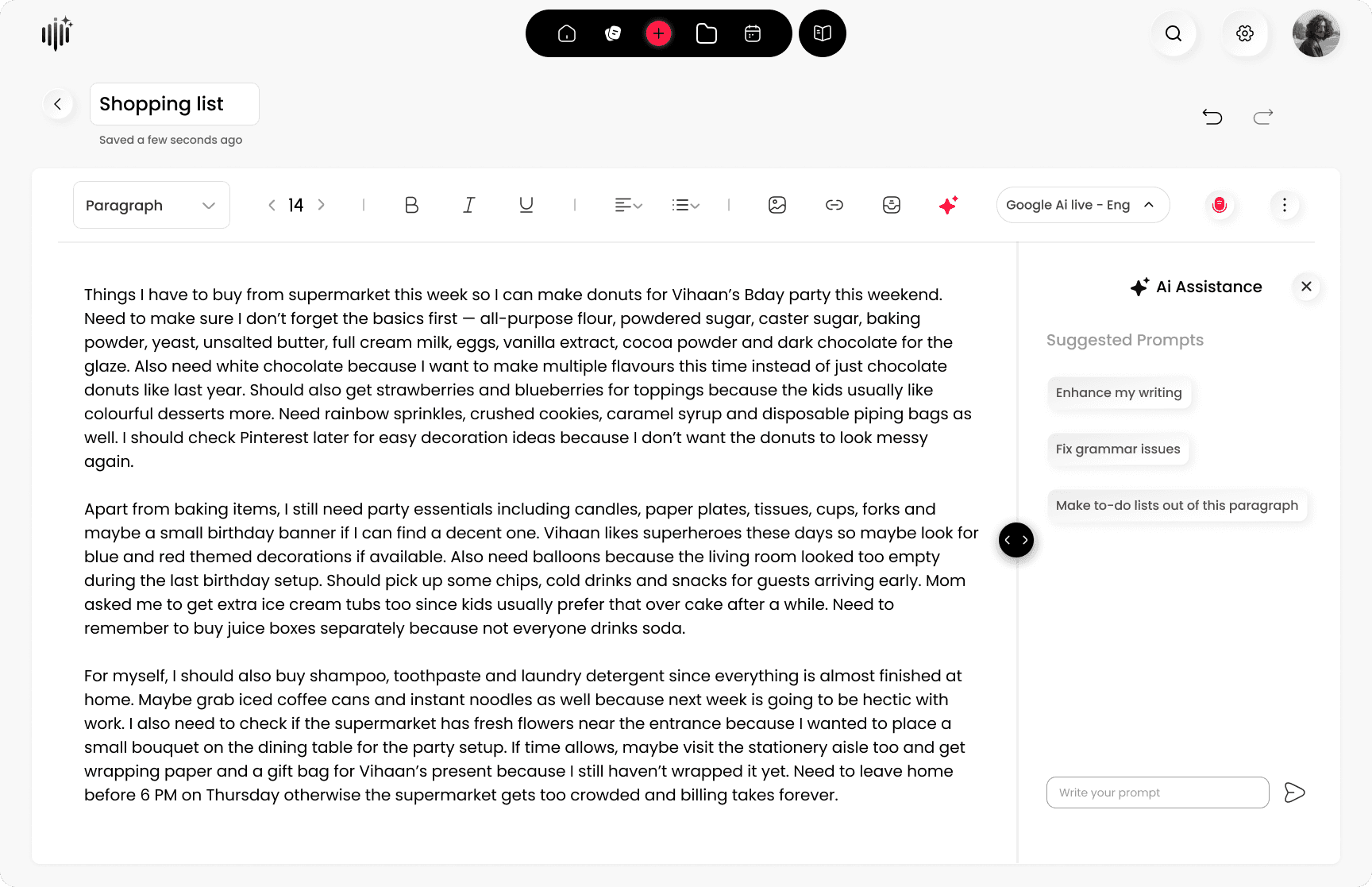
Keeping AI Within the Writing Experience
Instead of redirecting users to a separate AI interface, AI assistance remains available directly beside the editor.
This reduces unnecessary context switching and keeps users focused on writing.
Focused Reading Experience
Reading Mode intentionally removes unnecessary interface elements to create a distraction-free environment for long-form reading.

Design Screens
Explore a selection of key screens from the product. The complete experience consists of 90+ screens, including Light & Dark themes and the Novel module. The screens below highlight some of the core workflows and the most representative interfaces.




Outcome
Designed more than 90 production-ready screens
Built complete light and dark themes.
Created a scalable design system for consistent product development.
Designed an end-to-end user experience spanning voice capture, AI writing, journaling, note management, and reading.
Delivered developer-ready designs for implementation.
Final Reflection
This project strengthened my understanding of designing complex product ecosystems rather than individual interfaces.
Working on a feature-rich platform taught me how to balance usability with scalability, simplify complex workflows, and maintain consistency across a large design system.
More importantly, I learned that good product design isn't about adding more features—it's about making those features feel intuitive, connected, and effortless to use.
This project reflects not only my UI design skills but also my ability to approach product design with systems thinking, attention to detail, and a strong focus on creating intuitive user experiences.